
Skip to the content Skip to the main menu
gNial

Development

  • Sobre

Development

  • Sobre

Massive Compress & Resize Images

Download

https://sourceforge.net/projects/icompress/

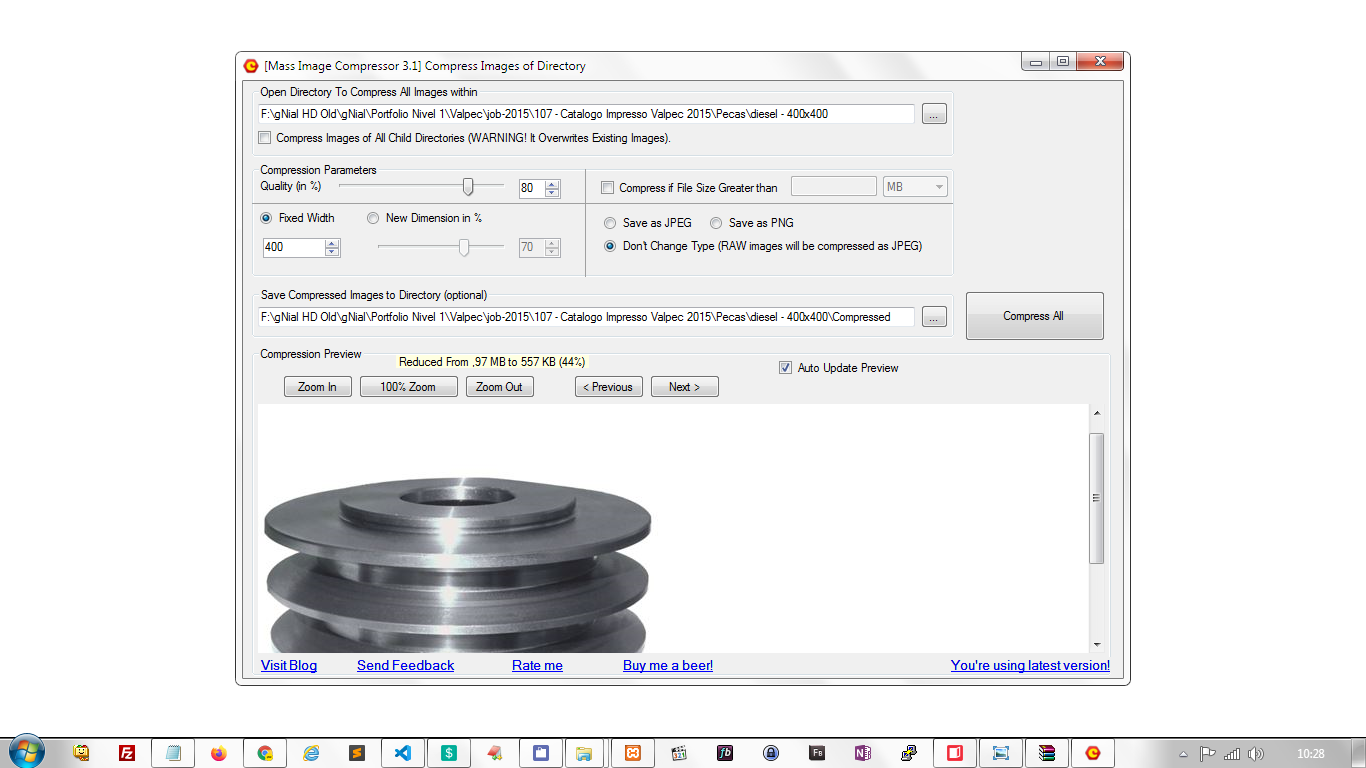
  • Selecione a pasta que deseja comprimir e redimensionar as imagens.
  • Escolha 80% de qualidade para boa qualidade e compressão.
  • Selecione uma largura fixa, se desejar: Fixed Width
  • Clique em Compress All para iniciar

  • Post date
    February 19, 2020
  • Posted in Uncategorized
Previous post: Image Crop / Cortar Imagem Next post: SQL – Change DATE from SQL

Related Posts

E-mail – Configurar e-mail no Outlook 2013 / Setting account e-mail in Outlook 2013

  • Post date
    June 16, 2016

MySQL String Function \ Função com Valores

  • Post date
    February 8, 2012

E-mail – Configurar e-mail no Outlook Express / Setting account e-mail in Outlook Express

  • Post date
    May 17, 2013

Ubuntu – open apps faster – load from RAM

  • Post date
    October 20, 2020

Theme by Anders Norén