
Skip to the content Skip to the main menu
gNial

Development

  • Sobre

Development

  • Sobre

Massive Compress & Resize Images

Download

https://sourceforge.net/projects/icompress/

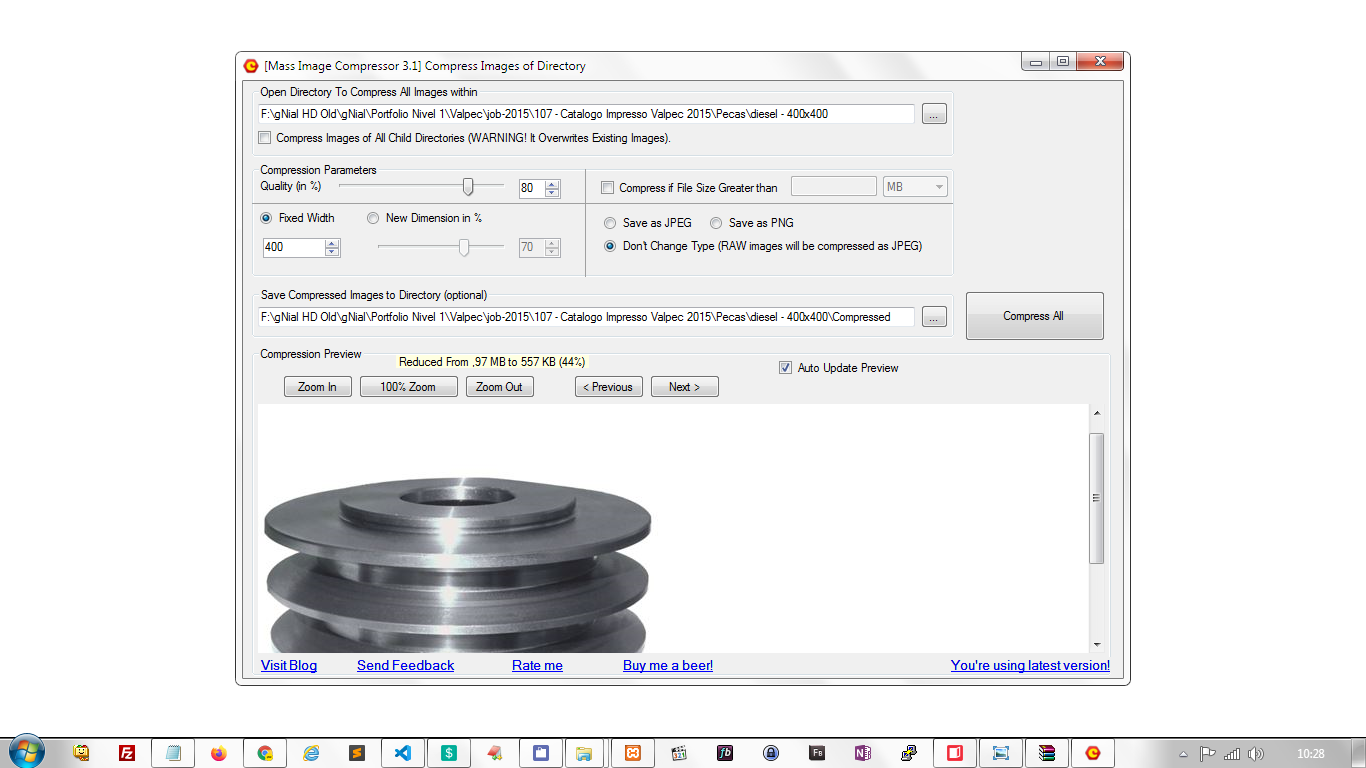
  • Selecione a pasta que deseja comprimir e redimensionar as imagens.
  • Escolha 80% de qualidade para boa qualidade e compressão.
  • Selecione uma largura fixa, se desejar: Fixed Width
  • Clique em Compress All para iniciar

  • Post date
    February 19, 2020
  • Posted in Uncategorized
Previous post: Image Crop / Cortar Imagem Next post: SQL – Change DATE from SQL

Related Posts

PHP Cron Job: How to Execute PHP Script Using Crontab in Linux (cronJob)

  • Post date
    October 15, 2015
Fallback image

Backup Server checklist

  • Post date
    November 22, 2021

Ubuntu – open apps faster – load from RAM

  • Post date
    October 20, 2020

MySql – Terminal / Importar grande arquivo / Import a large file

  • Post date
    January 2, 2013

Theme by Anders Norén